
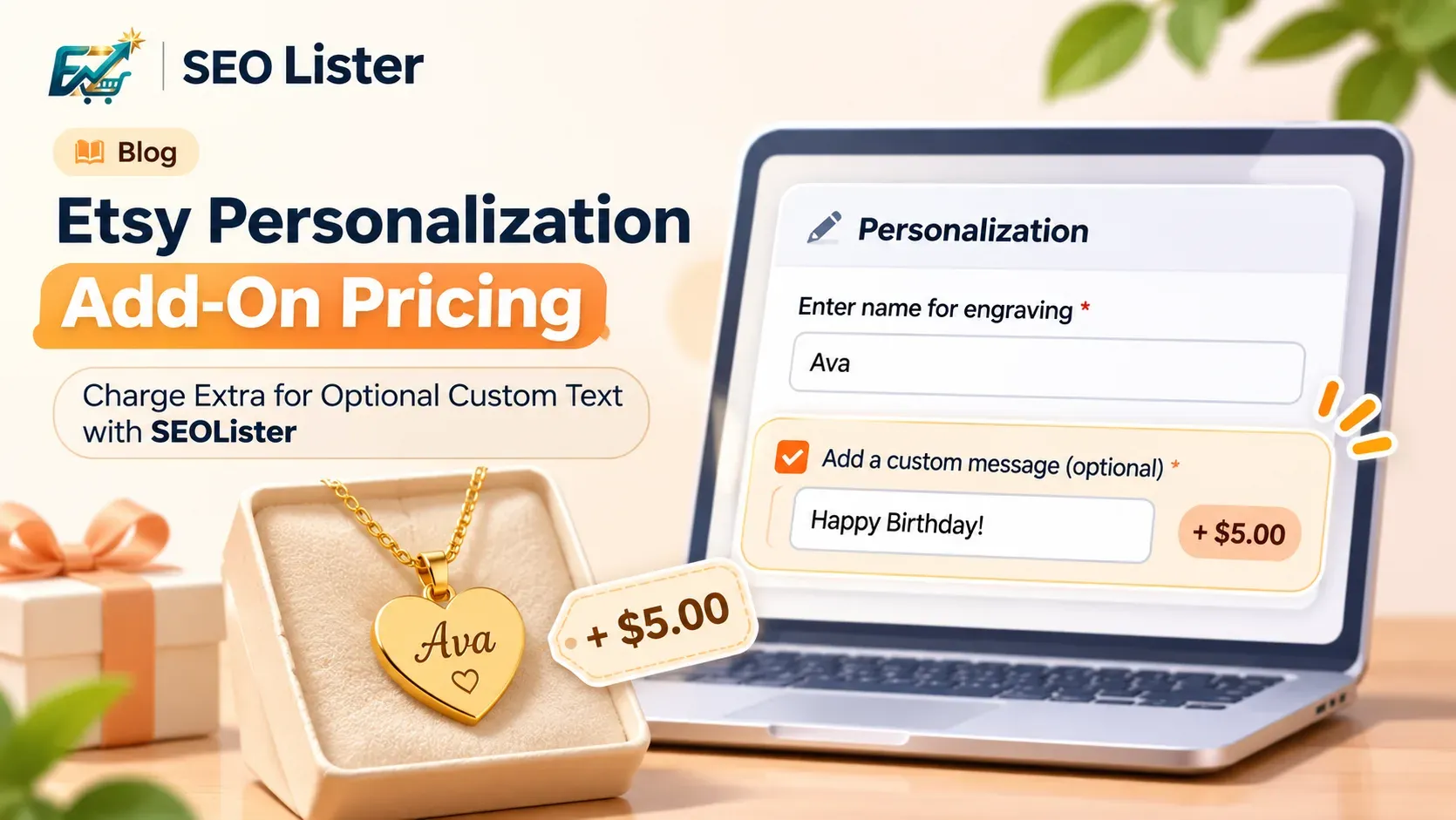
Etsy now supports add-on pricing for optional text personalization questions, allowing sellers to charge an additional amount when buyers choose to provide extra custom text. SEOLister also supports configuring this option as part of the Etsy listing-personalization workflow.
This is useful for sellers offering personalized products such as engraved gifts, custom jewelry, printed items, and made-to-order products. Instead of including every personalization request in the base price, sellers can make certain text options optional and attach an additional charge.
For example, a jewelry seller can include basic name engraving in the product price and offer an optional additional engraving message for an extra charge.
What is Etsy personalization add-on pricing?
Personalization add-on pricing lets an Etsy seller attach an additional price to an optional text-input personalization question.
When a buyer chooses to provide the optional text, Etsy adds the configured amount to the product price. The buyer can see the updated total before checkout.
For example:
| Product price | Optional personalization | Add-on price | Total |
|---|---|---|---|
| $25 | No extra message | $0 | $25 |
| $25 | Add a custom gift message | $5 | $30 |
The additional charge is associated with the optional text question. It is not a separate product variation or a general price adjustment for every personalization choice.
Etsy introduced this functionality through its Open API update announced on July 20, 2026. See Etsy's official API announcement and the Personalization Add-On Pricing documentation.
Which personalization questions support add-on pricing?
There is an important limitation: Etsy currently supports add-on pricing only for optional text-input questions.
| Personalization question type | Add-on pricing supported? |
|---|---|
| Optional text input | Yes |
| Required text input | No |
| Dropdown | No |
| File upload | No |
The question must be optional. Sending an add-on price for a required text question or another question type results in a validation error in the API.
Etsy's current documentation specifies an add-on price range of $0.20 to $500 USD equivalent, based on the shop's configured currency. The price is entered as a numeric amount, and Etsy uses the shop's currency rather than allowing an unrelated currency to be selected for the add-on.
Always check the live Etsy documentation for current requirements.
Two examples of personalization add-on pricing
Example 1: Personalized necklace with additional engraving
Imagine you sell a personalized necklace. The standard product includes engraving of the buyer's name. Some buyers may also want an additional date or short message engraved on the back.
You can structure the personalization like this:
| Field | Type | Price |
|---|---|---|
| Enter the name for engraving | Required text | Included |
| Add an optional date or message | Optional text | +$5 |
The buyer receives the standard name engraving with the product. They can also choose to enter an additional message for the extra charge.
Example 2: Customized gift with an additional message
Imagine you sell a personalized wooden gift plaque. The standard product includes a family name. Buyers may also want an additional message at the bottom of the plaque.
You could configure:
| Field | Type | Price |
|---|---|---|
| Enter the family name | Required text | Included |
| Add an optional second message | Optional text | +$8 |
A buyer who only wants the family name pays the standard product price. A buyer who wants the extra message sees the additional charge before checkout.
These are illustrative examples. Set your actual add-on prices based on the additional production time, materials, and costs involved.
How to set up personalization add-on pricing in SEOLister
SEOLister supports configuring add-on pricing for eligible optional text personalization questions as part of the listing workflow.
You can use it when preparing a new listing or updating an existing personalization setup.
Step 1: Open your Etsy listing in SEOLister
Choose the listing you want to create or optimize. Review its product information and decide which personalization details buyers need to provide.
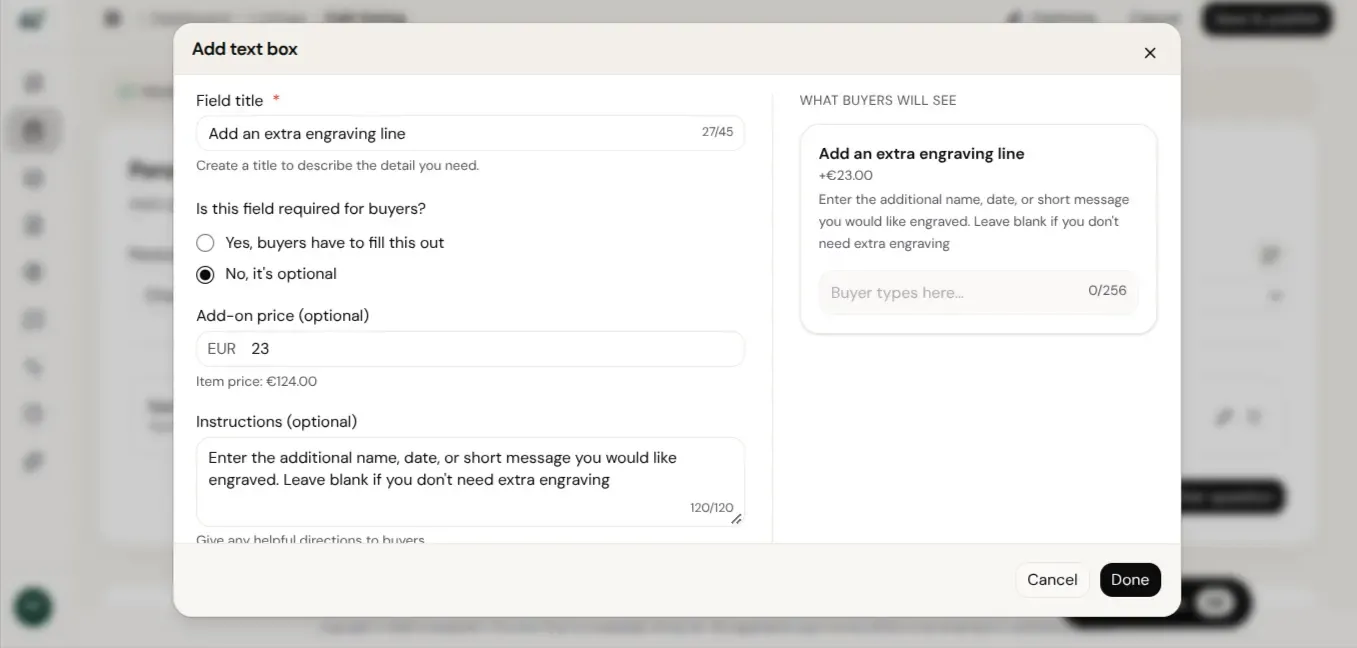
Step 2: Add a text personalization question
Create a clear question that tells buyers exactly what information to enter.
For example:
Question: Add an additional engraving message.
Instructions: Enter the short message you would like engraved on the back of the necklace. Leave this field blank if you do not need additional engraving.
Step 3: Make the question optional
Add-on pricing is only available for optional text-input questions. Make sure the buyer can leave the field empty and still purchase the standard product.
Step 4: Enter the additional price
Set the extra amount for this optional text service.
For example:
- Standard product price: $25
- Optional additional engraving: $5
- Product total when selected: $30
Use a price within Etsy's supported range and confirm that it makes sense for your product and shop currency.
Step 5: Review and publish
Before publishing, check:
- The question uses the text-input type.
- The question is optional.
- The additional price is correct.
- The instructions explain what the buyer should enter.
- The base product price is correct.
- The additional customization is something you can actually fulfill.
After reviewing the settings, save or publish the listing through your SEOLister workflow.
Note: The exact available settings may depend on the current SEOLister listing workflow and Etsy integration. Always verify that the optional question and its add-on price appear correctly on the live Etsy listing.
How buyers see the additional price
The purpose of add-on pricing is transparency.
When a buyer selects an optional personalization field with an additional price, Etsy automatically adds that amount to the item price. Buyers can see the updated total before checkout.
The add-on amount is also reflected in relevant buyer and seller order details.
For sellers, this makes it easier to communicate the cost of optional customization before an order is placed. For buyers, it helps explain why a personalized product may have a different total depending on the options they choose.
Important things to know before using add-on pricing
Add-on pricing is not available for every question type
Do not configure an additional price on dropdown or file-upload questions. Etsy currently supports add-on pricing only for optional text-input questions.
Required text questions cannot have an add-on price
A required question asks every buyer to provide information. Etsy does not allow an add-on price on that question type.
A practical setup is to keep essential information required and create a separate optional text question for additional paid customization.
Make the additional service clear
Avoid vague instructions such as “Extra customization available.”
Instead, explain what the additional price covers:
Add a second engraving line on the back of the pendant (+$5).
Clear instructions help buyers understand the difference between the included product and the optional service.
Review existing questions when editing listings
Etsy's API documentation includes an important integration requirement for existing add-on prices.
After the July 20–August 20, 2026 migration period, integrations updating an existing text personalization question that already has an add-on price must explicitly send the price value to preserve or change it. To remove an existing price, the integration must send 0 or null.
This matters when an existing personalization question is edited. Sellers should check that their listing tool preserves the current add-on price instead of accidentally removing it. See the official Etsy API documentation for the technical details.
Create more flexible personalized listings with SEOLister
Personalized products often involve different levels of customization. Some details are included in the standard product price, while others require extra work.
Etsy personalization add-on pricing gives sellers a way to communicate that distinction directly in the listing.
With SEOLister, you can prepare Etsy listing content and configure eligible optional text personalization questions with additional pricing as part of your listing workflow. Review the questions, instructions, and prices before publishing.
Create and optimize your personalized Etsy listings with SEOLister.
Frequently asked questions
What is Etsy personalization add-on pricing?
Etsy personalization add-on pricing lets sellers charge an additional amount for an optional text-input personalization question. Buyers see the updated item total when they choose that additional customization. It is intended for optional text fields rather than every type of personalization question.
Can I charge extra for optional personalization on Etsy?
Yes. Etsy supports an additional price for optional text-input personalization questions. The current documented price range is $0.20 to $500 USD equivalent, based on the shop's currency.
Can I add an extra price to a required personalization field?
No. Etsy only supports add-on pricing for optional text-input questions. Required text questions, dropdowns, and file-upload questions are not eligible.
Can I add a price to an Etsy personalization dropdown?
No. Etsy's current add-on pricing feature applies to optional text-input questions only. Dropdown options do not support this add-on price field.
What is the minimum Etsy personalization add-on price?
Etsy's current API documentation specifies a minimum add-on price of $0.20 USD equivalent. The maximum is $500 USD equivalent. The amount is interpreted using the shop's configured currency.
Does Etsy automatically add the personalization price to the order?
Yes. When a buyer chooses an optional text field with add-on pricing, Etsy adds the amount to the item price and displays the updated total before checkout. The amount is also reflected in relevant order details.
Can I configure Etsy personalization add-on pricing with SEOLister?
Yes. SEOLister supports configuring additional pricing for eligible optional text personalization questions within its listing workflow. Review the question type, optional setting, price, and instructions before publishing.
Make optional customization clearer for your buyers
Not every customization needs to be included in the standard product price. With Etsy add-on pricing, sellers can offer additional text personalization while showing buyers the extra cost before checkout.
Use SEOLister to prepare your listing and configure eligible optional text questions with additional pricing.
Primary CTA: Try SEOLister
Secondary CTA: Explore SEOLister features
Official sources
Etsy SEO
How to Set Up Personalized Etsy Listings (Custom Fields, Variations, and SEO)
Learn how to set up Etsy personalization fields, variations, and SEO for custom gifts. Write clearer instructions and create better product listings.

Etsy SEO
How to Create an Etsy Listing with SEOLister in 2026
Spending an hour per listing on titles and tags? Use an SEO-first create flow so new products go live complete—and searchable—the first time.
Etsy SEO
Etsy Listing Limits (2026): Title, Tags, Description, Photos & Video
Etsy listing limits for titles, 13 tags, descriptions, photos, and videos in one place. Confirm the live rules in Etsy Help before you publish.